
Smart Pill Identifier
BuildLoopMedical
3.6376.00 Reviews
- Version
- 3.0.2
- Installs
- 100.00K
- Age Rating
- Everyone
Screenshots

Our Review of Smart Pill Identifier
 Analysis by Appyee
When an unfamiliar tablet turns up in a bag or at the back of a cupboard, a phone camera can feel like the quickest place to start. I see Smart Pill Identifier as a convenient first check, not a substitute for a pharmacist or a reliable source of medical advice. That distinction matters: a possible visual match can help you ask a better question, but it cannot prove what a pill is or whether it is safe to take.
When the connection becomes part of the process
The central idea is straightforward: take a picture or use an existing image, then review possible pill matches. That makes the app useful when you have a clear view of a tablet and a moment to compare the result with the physical item. It also means the experience depends on more than simply opening the camera. A search or information lookup may need a working connection, so I would not make this my only plan in a place where service is unreliable.
If a result takes longer than expected, I would first check the connection and try again with a sharper, well-lit picture rather than repeatedly photographing the same blurry image. A close crop can help show the pill clearly, but I would keep enough context to avoid cutting off markings or distinctive edges. If the app cannot produce a confident-looking match, that is a reason to pause, not to choose whichever result appears first.
Useful in a mobile setting, with sensible limits
The camera workflow makes the most sense in everyday situations where a pill is physically available: sorting a medication drawer, checking a tablet found in a travel pouch, or helping a family member identify what is already in a labelled container. It is less useful when you only remember a pill’s color from yesterday or have a description passed along by someone else. In those cases, the image-based route has little to work with.
For a practical check, I would place the tablet on a plain, well-lit surface and photograph one item at a time. Keep the imprint visible, and compare the app’s suggestions with the original packaging or prescription label if those are available. Color alone is a weak basis for identification: lighting, camera processing, and wear can all change how a pill looks. Packaging and a pharmacist’s confirmation are better ways to resolve a mismatch.
If a lookup fails or a result seems uncertain
A camera tool can struggle with a pill that is chipped, obscured, unusually shaped, or photographed in poor light. If the first image produces no useful result, I would clean up the setup and try once more, but I would not treat repeated attempts as proof that a match is correct. Take note of the imprint and shape, keep the pill separate from other medication, and ask a pharmacist when identification affects a real dose.
This is particularly important for a tablet found loose or outside its original packaging. Even when a suggested match looks plausible, the app cannot establish who the pill belongs to, how it was stored, or whether it is still suitable to use. If a child or another person may have taken an unknown pill, contact local emergency or poison-control services rather than waiting on an app search.
What I would consider before using it
Smart Pill Identifier is a free medical app from BuildLoop. It has a 3.8 average from around 879 ratings, and more than 100,000 installs. It is rated for Everyone, with a minimum Android requirement of version 6.0; its current version is 2.9.5. The app first appeared on February 17, 2019, and offers in-app purchases priced from $4.99 to $99.99 per item. I would check the purchase details in the app before starting anything paid, especially if I only need an occasional lookup.
Because the workflow involves photographing medication, I would avoid including faces, prescription labels, addresses, or other personal details in an image unless they are genuinely needed. A plain background and a single pill make for a cleaner comparison and reduce the chance of capturing unrelated information. If you are uncomfortable sharing medication-related images with an app, a pharmacist or the manufacturer’s printed identification resources may be a better fit.
Compared with searching the web by color and shape, a camera-based identifier can make the initial search less tedious. But ordinary web searches may offer more context, while a pharmacist can ask follow-up questions and inspect the item directly. I would use the app to narrow down what to ask, not as the final authority. It is best suited to people who want a convenient reference while organizing medicines, and less suitable for anyone who needs a definitive answer before taking an unknown tablet.
Ever found yourself staring at an unidentified pill and wondering what on earth it might be? Enter the Smart Pill Identifier app, your new best friend in the world of medication management. I decided to give it a whirl, and let me tell you, it’s a handy little tool.
Getting Started with Smart Pill Identifier
First off, downloading the app was a breeze. It’s available on both Android and iOS, so no one’s left out in the cold. Once installed, I was greeted with a clean, user-friendly interface that didn’t make my head spin. I love apps that keep things simple, and the app nails it.
Features That Stand Out
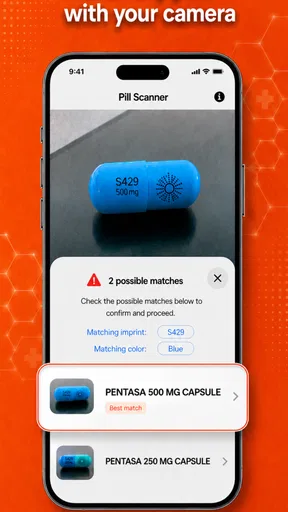
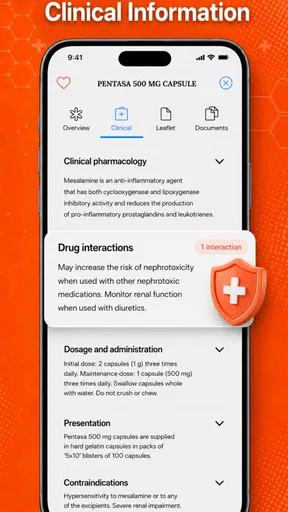
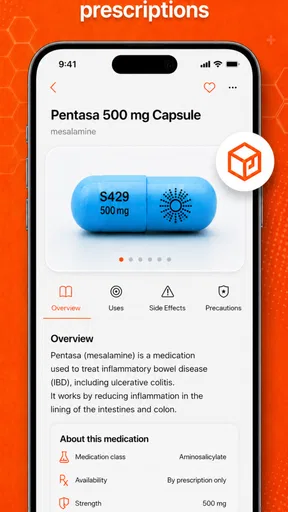
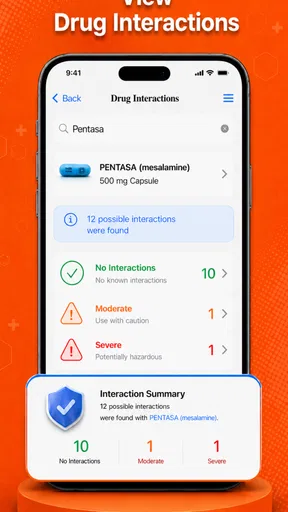
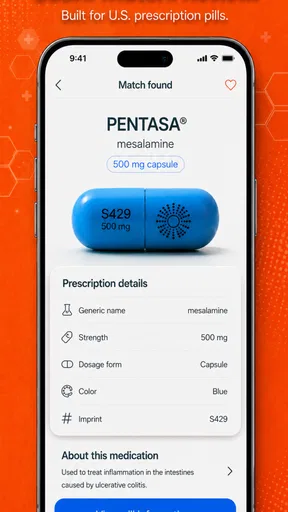
The main feature is, of course, identifying pills. You just snap a picture of the mystery med, and the app works its magic. Within seconds, it provides a list of possible matches complete with detailed information. It's like having a mini pharmacist in your pocket! The app also offers a comprehensive database of medications, so you’re not left guessing.
Another cool feature is the pill reminder. If you’re like me and tend to forget whether you’ve taken your meds, this can be a lifesaver. You can set custom reminders, and the app will nudge you when it’s time to pop a pill. Trust me, it’s more reliable than relying on post-it notes scattered around your house.
User Experience
As someone who isn’t exactly tech-savvy, I found the app incredibly intuitive. The developers have clearly put a lot of thought into the user experience. Navigating through the app is smooth, and it doesn’t bombard you with ads, which is a massive plus in my book. It’s all about making the app as user-friendly as possible, and they’ve succeeded.
For someone juggling several medicines, reminders are more useful when they reflect a real routine rather than a vague intention. I would set them around consistent daily cues—breakfast, brushing my teeth, or preparing for bed—and keep the app’s alert separate from the actual pill check. A reminder can prompt me to look at the label and confirm the dose, but it cannot verify that I have the right medicine in hand. That small distinction makes the feature more dependable in practice.
When helping a relative, I would also agree on who is responsible for updating reminders and checking that the schedule still matches the instructions from their clinician. If more than one person is helping, an app notification alone may not tell everyone whether a dose was taken. A shared written routine or a pill organizer may be a better companion for that household, while the app remains useful for looking up an unfamiliar tablet.
Real-World Scenarios
Imagine you find a pill under the couch and have no idea where it came from. Instead of panicking, you can whip out your phone, open the app, and snap a quick photo. Within moments, you have a list of potential matches, complete with dosage information and potential side effects. It’s like having a medical encyclopedia at your fingertips.
Or maybe you’re caring for an elderly relative who has a ton of different medications. Keeping track of them all can feel like juggling flaming swords. With the app, you can easily organize their pills, set up reminders, and ensure they’re taking the right ones at the right times.
A more routine example is packing for an overnight stay. I would compare the tablets against their labelled containers before leaving, rather than relying on a photo search after they have been mixed together. If one has already become separated, the image lookup can help me decide what to check next; it should not be a shortcut for putting an uncertain pill back into the travel case. Keeping each medicine in its original packaging is less convenient than loose sorting, but it preserves the information needed to resolve doubts.
The app is also a better match for a person who wants to identify a pill in hand than for someone trying to build a complete medical record. If your main need is tracking doses across a complex treatment plan, I would compare its reminder workflow with a dedicated medication organizer or the schedule provided by your care team. If your main need is confirming a medicine, the package, prescription label, and pharmacist remain more dependable sources than a visual suggestion.
Final Thoughts
Overall, the app is a gem for anyone who takes medication or cares for someone who does. It’s practical, easy to use, and genuinely helpful. Whether you’re dealing with a handful of vitamins or a medicine cabinet full of prescriptions, this app is a must-have.
I would soften that recommendation for anyone who expects a camera result to settle a high-stakes question on its own. The useful role here is narrower: make a first pass, gather clues, and then verify a consequential answer through the packaging or a qualified professional. That approach gives the convenience real value without asking the app to do a job it cannot safely do.
So next time you’re scratching your head over a rogue pill, remember that this app has your back. It’s like having a pocket-sized pharmacist ready to help out whenever you need. And honestly, in today’s fast-paced world, who couldn’t use a little extra help?
My connectivity verdict is that Smart Pill Identifier can be a handy on-the-go reference when a usable image and a reliable connection are available, while its reminder feature adds a separate bit of everyday organization. I would keep it as one tool among several, use careful photos, and turn to a pharmacist whenever the match is uncertain or the decision could affect someone’s health.
Verdict
Strengths of Smart Pill Identifier
- Easy-to-use interface for quick searches.
- Comprehensive database of pill information.
- Includes images for accurate identification.
- Offline access available for convenience.
- Regularly updated with new medications.
Limitations of Smart Pill Identifier
- Limited features in free version.
- Ads can be intrusive at times.
- No direct link to pharmacies.
- Requires camera permissions for use.
- Occasional slow loading times.
Similar Picks in This Category
View All
WebMD: Symptom Checker
WebMD, LLC4.1

Microphone Amplifier
DOSA Apps4.2

Anatomy Learning - 3D Anatomy
3D Medical OU4.5

Period Tracker and Calendar
SimpleInnovation4.9

GoodRx: Prescription Coupons
GoodRx4.8

CVS Health
CVS Pharmacy4.5
Frequently Asked Questions
What is Smart Pill Identifier and how does it work?
Smart Pill Identifier is an app designed to help users quickly identify pills based on their appearance. By using your device's camera, the app can scan a pill's shape, color, and imprint, then cross-reference this information with its extensive database to provide accurate identification. This is particularly useful for ensuring medication safety and avoiding potential mix-ups.
Is Smart Pill Identifier available for both Android and iOS devices?
Yes, Smart Pill Identifier is available for download on both Android and iOS platforms. You can find the app on the Google Play Store for Android devices and the Apple App Store for iOS devices. Make sure your device meets the necessary system requirements for a smooth experience.
Does Smart Pill Identifier require an internet connection to work?
While Smart Pill Identifier can function offline for scanning pills, it requires an internet connection to access the most up-to-date database records. This ensures that you are receiving the most current information about your medication, as databases are frequently updated with new pill data.
Is it safe to rely solely on Smart Pill Identifier for medication identification?
Smart Pill Identifier is a helpful tool, but it should not replace professional medical advice. While the app provides accurate identifications, it is always recommended to consult with a healthcare professional before taking any medication, especially if you have any doubts or concerns about the pill in question.
Are there any privacy concerns when using Smart Pill Identifier?
Smart Pill Identifier prioritizes user privacy and does not store any personal information without consent. The app may require access to your camera for scanning purposes, but it does not save images or data on external servers. Always review the app's privacy policy to understand how your data is managed.
